We try the file command for disko-2.dd from previous task and disko-3.dd and immediately see the difference:

disko-2.dd has partitions, while disko-3.dd is a single partition with the FAT32 file system.
NOTE
OEM-ID "mkfs.fat": OEM-ID (Original Equipment Manufacturer ID) — field in the boot sector of the FAT-partition, that identifies the program that created the file system.
mkfs.fat— is a standard utility in Linux used to create FAT file systems (FAT12, FAT16, FAT32).
This means that such disk can be mounted immediately, without “extracting” partition 1 or 2 from it:
sudo mkdir /mnt/disko3
sudo mount -o loop disko-3.dd /mnt/disko3
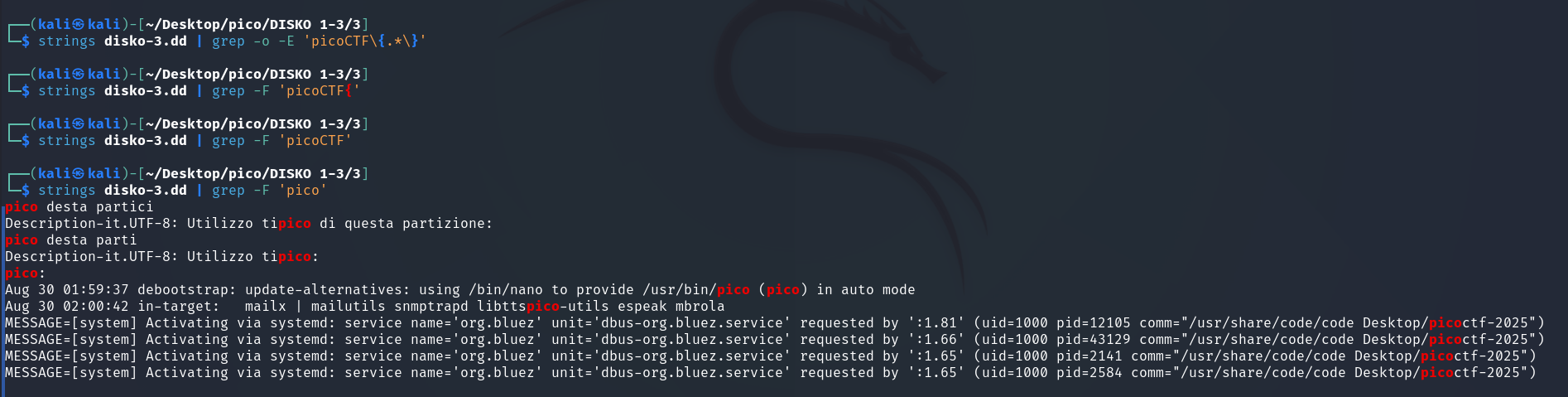
Trying the same method as for DISKO 2:
Next, I move on to /mnt/disko3/log/journal/480afdbb61874a758c0b53617cfc8e8f:
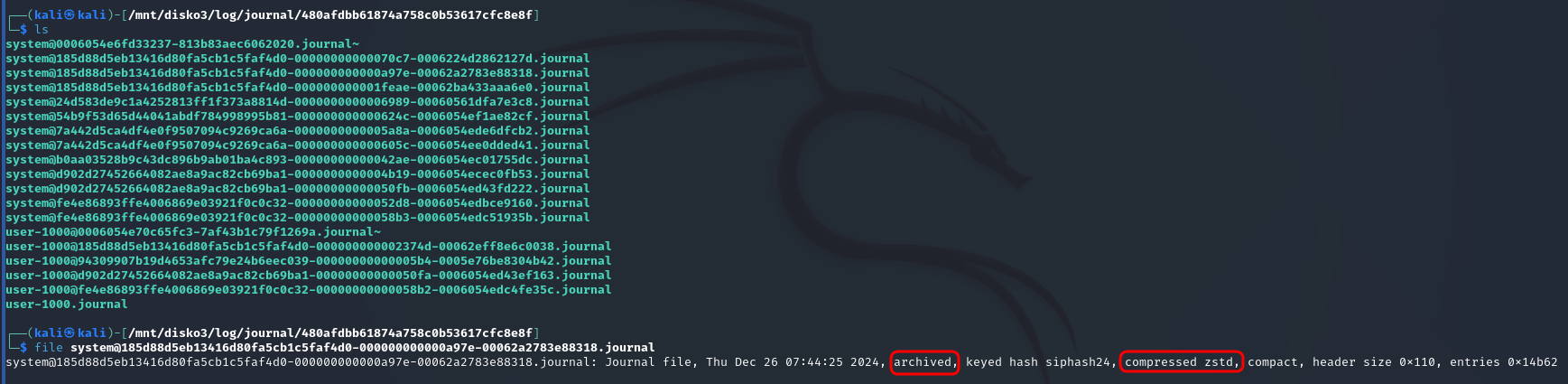
archived means that this file is no longer used for writing new logs.
compressed zstd means that logs in this file are compressed with zstd algorithm
So strings or cat won’t. I tried journalctl. First, let’s find out the absolute path to any file from the journal so that we can easily copy it:
realpath <filename>journalctl --directory=/mnt/disko3/log/journal/480afdbb61874a758c0b53617cfc8e8f | grep "picoCTFwith time filtering:
journalctl --directory=/mnt/disko3/log/journal/480afdbb61874a758c0b53617cfc8e8f --since "2024-12-26 07:00:00" | grep -o -E "picoCTF\{.*\}"Since the files are compressed with zstd, zstdcat is needed to read them:
zstdcat /mnt/disko3/log/journal/480afdbb61874a758c0b53617cfc8e8f/*.journal | grep -o -E "picoCTF\{.*?\}"to avoid mistakes alerts:
zstdcat /mnt/disko3/log/journal/480afdbb61874a758c0b53617cfc8e8f/*.journal 2>/dev/null | grep -E "picoCTF\{.*?\}"But to no avail.
Then, I noticed file flag.gz in /mnt/disko3/log:

extracted it to specified output file:
gunzip -c flag.gz > ~/Desktop/pico/DISKO\ 1-3/3/flag_gunzippedand all of a sudden it was enough:
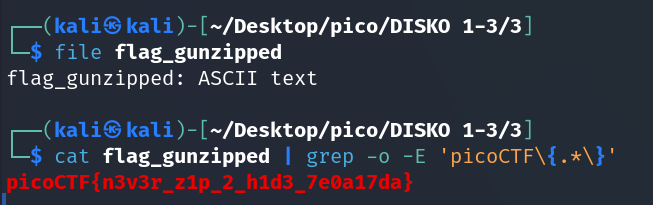
picoCTF{n3v3r_z1p_2_h1d3_7e0a17da}