Download the file mobpsycho.apk, which is recognized by the file command as Zip archive data.
Unpacking
There are three ways to unpack this apk:
apktool d mobpsycho.apk
unzip mobpsycho.apk -d mobpsycho
binwalk -e mobpsycho.apk
Search by 'picoCTF\{.*\}'
Each time I unpacked a challenge file a separate directory was created, so I started searching for the string “picoCTF” in each of these directories:
Search for strings with grep recursively across all files:
find mobpsycho -type f -exec strings {} \; | grep -oE 'picoCTF\{.*\}'Alternative version with xargs:
find mobpsycho -type f -print0 | xargs -0 strings | grep -oE 'picoCTF\{.*\}'TIP
Full list of commands with explanations to solve this challenge I left here: click
Tried searching manually through files:
strings mobpsycho/AndroidManifest.xml | grep -oE 'picoCTF\{.*\}'
strings mobpsycho/classes.dex | grep -oE 'picoCTF\{.*\}'
strings mobpsycho/classes2.dex | grep -oE 'picoCTF\{.*\}'
strings mobpsycho/classes3.dex | grep -oE 'picoCTF\{.*\}'
Search in /res directory:
find mobpsycho/res -type f -exec strings {} \; | grep -oE 'picoCTF\{.*\}'Search in both text and binary files:
grep -r -a -oE 'picoCTF\{.*\}' mobpsycho/Search by '[0-9a-fA-F]{16,}'
Then I caught a thought that perhaps the flag was encoded in some way, for example in hex code. So I wrote a regular expression that would contain:
- numbers 0-9
- letters of the English alphabet in lower and upper case
- minimum sequence length of 16 characters
Let’s try a basic search using the above rules:
find mobpsycho -type f -exec strings {} \; | grep -oE '[0-9a-fA-F]{16,}'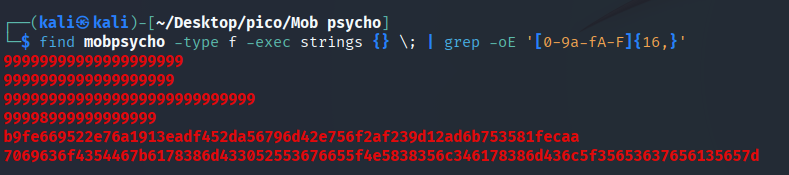
One of the sequences looks long enough to be a flag, but let’s try some more search options.
Let’s add sort -u:
find mobpsycho -type f -exec strings {} \; | grep -oE '[0-9a-fA-F]{16,}' | sort -u 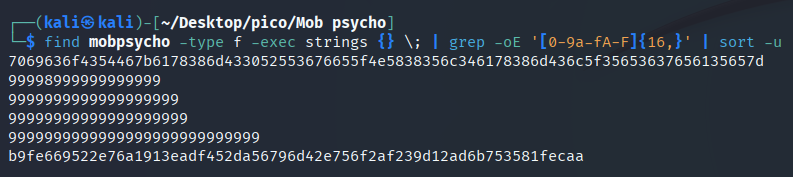
Since we have found a potential flag, let’s try to form a command that outputs only it, without cluttering up the terminal as much as possible. To do this, we will take the first characters of the flag’s hex code:
find mobpsycho -type f -exec strings {} \; | grep -i "7069636f4354467b" | head -5
Command that will search for and decode the flag:
find mobpsycho -type f -exec strings {} \; |
grep -oE '[0-9a-fA-F]{60,}' |
xargs -I {} sh -c 'echo "Hex: {}"; echo "Decoded: $(echo {} | xxd -r -p)"; echo "---"'
picoCTF{ax8mC0RU6ve_NX85l4ax8mCl_5e67ea5e}